Ultimate MyExecs.ai Product Guide: How to Scale Decisions with an AI C-Suite
Learn how to use MyExecs.ai to scale strategic decisions across your business. This complete product guide covers workspace navigation, cross-executive workflows, the virtual Leadership Boardroom, diagnostic tools, and live context integrations for founders and CEOs.
In this article
Building and scaling a high-growth business requires continuous strategic clarity across cash flow management, customer acquisition, operational efficiency, and tech stack architecture. Historically, founders and CEOs had to rely on fragmented advisory calls, static BI reports, or expensive full-time executive hires to navigate critical inflection points.
MyExecs.ai changes this paradigm by delivering an on-demand AI C-suite designed for founders, CEOs, and operators. This platform equips leadership with dedicated AI executives who understand your industry context, share memory across functional departments, and collaborate in real time to solve complex business challenges.
This comprehensive product guide outlines how to navigate the workspace, collaborate with your executive team, leverage the virtual Leadership Boardroom, and integrate live company context for automated strategic intelligence.
Quick Summary: What is MyExecs.ai?
MyExecs.ai is an AI business advisory platform that provides founders and CEOs with a virtual C-suite (CMO, CFO, CRO, CTO, COO, and CHRO). Key capabilities include shared cross-executive memory, a virtual Leadership Boardroom for strategic consensus, specialized diagnostic studio tools, and native integrations with CRMs, ERPs, and financial platforms.
1. Meet Your AI Executive Team
Each AI executive within MyExecs.ai is configured with specialized domain expertise, deterministic financial and operational models, and hands-on strategic toolsets tailored to your business goals.
| Executive Seat | Role & Function | Key Strategic Focus Areas |
|---|---|---|
| Jonny Reed | Chief Marketing Officer (CMO) | Brand positioning, customer acquisition strategies, Ideal Customer Profile (ICP) definition, messaging, and campaign architecture. |
| Eleanor Vance | Chief Financial Officer (CFO) | Cash flow forecasting, runway protection, P&L diagnostic checks, unit economics optimization, and pricing model analysis. |
| Priya Shah | Chief Revenue Officer (CRO) | Pipeline management, sales funnel optimization, conversion rate enhancement, enterprise deal strategy, and sales cycle reduction. |
| Alex Rivera | Chief Technology Officer (CTO) | Tech stack architecture, engineering velocity, AI implementation roadmaps, build-versus-buy analysis, and cybersecurity posture. |
| Marcus Vance | Chief Operating Officer (COO) | Operational efficiency, fulfillment workflows, capacity planning, bottleneck resolution, and executive KPI scoreboards. |
| Sarah Jenkins | Chief Human Resources Officer (CHRO) | Organizational design, hiring prioritization, talent retention strategies, leadership alignment, and team performance management. |
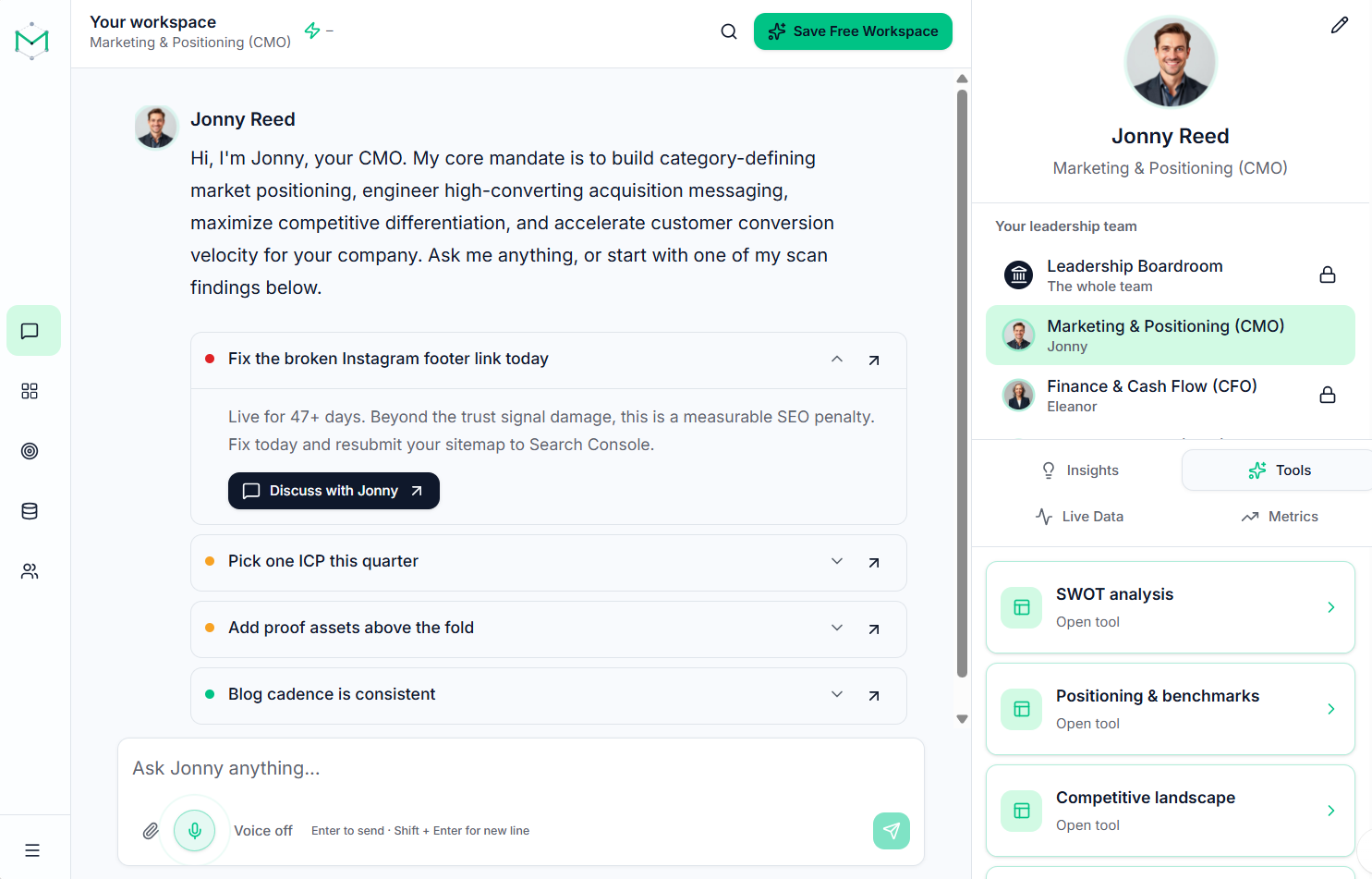
2. Navigating the Workspace (/workspace)
The MyExecs.ai user interface is engineered specifically for speed, context retention, and focused execution.
┌────────────────────────────────────────────────────────────────────────┐
│                        MyExecs Workspace Canvas                        │
├──────────────┬──────────────────────────────────────────┬──────────────┤
│ Executive    │ Full-Width Chat Canvas                   │ Studio Tools │
│ Selector     │                                          │ (Slide-Out)  │
│              │ • Markdown & Data Tables                 │              │
│ [ Boardroom ]│ • Inline Message Actions                 │ • P&L Engine │
│ [ Eleanor  ] │ • Voice Recording (Mic)                  │ • ICP Hub    │
│ [ Jonny    ] │ • Date Browser & Search                  │ • Funnels    │
│ [ Priya    ] │                                          │ • KPIs       │
└──────────────┴──────────────────────────────────────────┴──────────────┘
-
Executive Selector (Left Rail): Quickly switch between dedicated 1-on-1 dialogues with specific executives or enter the pinned Leadership Boardroom located at the top of the rail.
-
Full-Width Chat Canvas: Clean, distraction-free interface supporting full Markdown rendering, code snippets, financial tables, and auto-focus typing.
-
Studio Tools (Slide-Out Sheets): Embedded utility sheets that slide open alongside your conversation. These allow you to adjust P&L calculations, audit funnel conversion rates, or review positioning templates without losing chat context.
-
Voice Messaging: Tap the microphone icon to dictate prompts using voice-to-text, or toggle Voice playback on to listen to executive recommendations while multitasking.
-
Date Browser: Click Jump to date at the top of any chat thread to browse past conversations organized chronologically by calendar day, complete with message counts and topic tags.
3. Message Actions & Cross-Executive Intelligence Workflows
Every message in the workspace includes an inline action bar next to the timestamp, enabling seamless cross-departmental collaboration:
-
Star (☆): Highlight crucial strategic takeaways. Starred messages display a gold accent border and can be filtered instantly using the chat search tool.
-
Forward (➡️): Pass an insight or financial data point directly from one executive to another (or into the Leadership Boardroom). A quote banner automatically attaches to your message composer so the receiving leader reviews the exact source context.
-
Reply (↩️): Target a specific point inside a long answer. This pins a quote box above your input field to maintain tight context.
-
Listen (🔊): Activate clear text-to-speech narration for long-form strategic briefings.
-
React (😊): Apply emoji tags to quickly flag approvals, ideas, or action items.
-
Copy: Perform a one-click copy of formatted tables, action plans, and code blocks for immediate export into internal documents.
4. The Virtual Leadership Boardroom (/workspace?exec=boardroom)
When a critical business decision impacts marketing budgets, sales targets, financial runway, and operational capacity simultaneously, use the Leadership Boardroom.
┌────────────────────────────────────────────────────────────────────────┐
│                      Leadership Boardroom Workspace                    │
├────────────────────────────────────────────────────────────────────────┤
│                     [ Interactive Oval Roster ]                        │
│   (CFO: Eleanor)  (CMO: Jonny)  (CRO: Priya)  (COO: Marcus)  (CTO: Alex)   │
│         [Active]        [Active]      [Muted]       [Active]      [Muted]  │
├────────────────────────────────────────────────────────────────────────┤
│ Boardroom Discussion Thread                                             │
│ ├── Eleanor (CFO): "Cash runway permits a $15k monthly spend increase."│
│ └── Jonny (CMO):   "Reallocating budget to paid acquisition channels." │
├────────────────────────────────────────────────────────────────────────┤
│ [ Get Boardroom Consensus ]  ──►  [ Save to Permanent Decision Log ]   │
└────────────────────────────────────────────────────────────────────────┘
Key Boardroom Capabilities
-
Shared Leadership Memory: The Boardroom automatically aggregates context from recent 1-on-1 executive chats, document uploads, bottleneck logs, and saved diagnostic findings across your company profile.
-
Interactive Oval Table: A visual roster displaying your active C-suite. Click on any executive seat to toggle them between Active and Silenced. Only unmuted leaders evaluate and respond to your prompt, allowing you to focus discussions and optimize credit usage.
-
Sequential Perspective Pacing: AI executives respond in order with clear role headings, allowing you to evaluate distinct functional viewpoints step by step.
-
Get Boardroom Consensus: Tap the consensus button whenever two or more leaders weigh in on a topic. The system synthesizes conflicting opinions, identifies trade-offs, flags risks, and provides a unified, prioritized action plan.
-
Permanent Decision Log: Save consensus outputs directly into your workspace's Decision Log, creating a searchable archive of strategic resolutions for team alignment and board reporting.
5. Executive Studios & Diagnostic Tools
In addition to conversational guidance, MyExecs.ai provides specialized operational diagnostic engines maintained by individual AI leaders:
-
CFO P&L Diagnostic: A structured financial intake model featuring deterministic accounting calculations, working capital evaluations, and gross margin stress-tests.
-
CRO Funnel & Lead Source Engine: An analytics tool designed to locate conversion drop-off points from initial website visits to closed-won enterprise deals.
-
CMO Positioning & ICP Hub: A visual canvas for building target buyer personas, value proposition frameworks, and channel acquisition roadmaps.
-
COO KPI Scoreboard: A real-time dashboard for monitoring fulfillment velocity, capacity limits, and operational health metrics.
6. Industry Intelligence & Context Integration Hub
Generic AI tools often fail because they lack industry-specific terminology and real-time operational context. MyExecs.ai solves this through two specialized features:
10 Sector-Specific Dictionaries
MyExecs.ai automatically tailors its vocabulary, metrics, and strategic advice to your specific sector:
-
SaaS: Focuses on Net Revenue Retention (NRR), CAC Payback, LTV, and Churn.
-
Healthcare: Tracks Patient Acquisition Cost, Case Values, and Regulatory Compliance.
-
E-Commerce: Evaluates Average Order Value (AOV), Return on Ad Spend (ROAS), and Cart Abandonment.
-
Manufacturing, Freight & Logistics: Analyzes Capacity Utilization, Inventory Turnover, and On-Time In-Full (OTIF) rates.
-
Additional Sectors: Professional Services, Agencies, Real Estate, Construction, Hospitality, and Retail.
Context & Integrations Hub
Connect your live operational tech stack to supply your AI executive team with real company data:
-
CRM & Payments: Sync with HubSpot and Stripe for live revenue and pipeline metrics.
-
ERP & Analytics: Connect Google Workspace, SAP Business One, and custom data files to ground strategic advice in actual financial and inventory records.
7. Recommended Daily Operating Playbook for CEOs
To maximize value from your AI executive team, adopt this simple three-step operating rhythm:
┌────────────────────────────────────────────────────────────────────────┐
│                        Daily Operating Rhythm                          │
├────────────────────────────────────────────────────────────────────────┤
│ 1. Daily Check-In      ──► Ask CFO Eleanor or CMO Jonny quick targeted│
│                            operational questions.                      │
│ 2. Forward Cross-Check ──► Use 'Forward' to send marketing proposals   │
│                            directly to the CFO for margin validation.  │
│ 3. Boardroom Review    ──► Convene all active leaders for quarterly    │
│                            planning, generate consensus, and log it.   │
└────────────────────────────────────────────────────────────────────────┘
-
Daily Targeted Check-In: Start your morning by opening a 1-on-1 chat with your primary operational lead (e.g., CFO Eleanor for cash runway tracking or CMO Jonny for marketing performance).
-
Cross-Functional Decision Forwarding: When a marketing or sales proposal requires financial validation, use the Forward action to send the exact proposal to CFO Eleanor for immediate budget review.
-
Strategic Milestone Boardroom Meetings: Before committing to product launches, pricing changes, or quarterly plans, convene the Leadership Boardroom. Mute non-relevant seats, run Get Boardroom Consensus, and save the final resolution to your permanent Decision Log.
Frequently Asked Questions (FAQ)
What makes MyExecs.ai different from standard AI chat tools?
Standard AI chatbots operate in isolated, single-persona sessions without business context. MyExecs.ai provides a multi-agent C-suite that shares memory across functional roles, integrates natively with live business systems (CRMs, ERPs, financial tools), and includes specialized diagnostic tools like P&L calculators and pipeline analyzers.
How does the Leadership Boardroom build strategic consensus?
The Boardroom synthesizes input from active, unmuted executive seats. When you click Get Boardroom Consensus, the platform evaluates each leader's recommendations, resolves conflicting priorities (e.g., aggressive sales targets vs. conservative cash runway goals), and generates a unified, step-by-step implementation plan.
Is my proprietary financial and company data secure?
Yes. MyExecs.ai operates on strict responsible AI standards. Integrations use read-only API permissions, and customer data is processed in isolated memory. Your internal business records, financial figures, and strategy notes are never stored unencrypted or used to train public language models.
How do credit savings work with the Interactive Oval Table?
When conducting a Boardroom session, you can click any executive seat to mute them. Silenced executives do not process prompts or generate responses for that turn, ensuring that you only consume credits for the specific domain experts required for that decision.
Get insights in your inbox
Subscribe to receive new articles from the MyExecs.ai team.